
Exporting a Mixdown
When your mix is ready, export a mixdown to turn the whole project into a single stereo audio file you can share or upload. Everything you hear on playback — arrangement, effects, plugins, automation, fades, and turntable effects — is rendered into the file exactly as it plays.
Exporting
Choose File ▸ Export Mixdown… (Ctrl+M). This is available once your project contains audio to render.
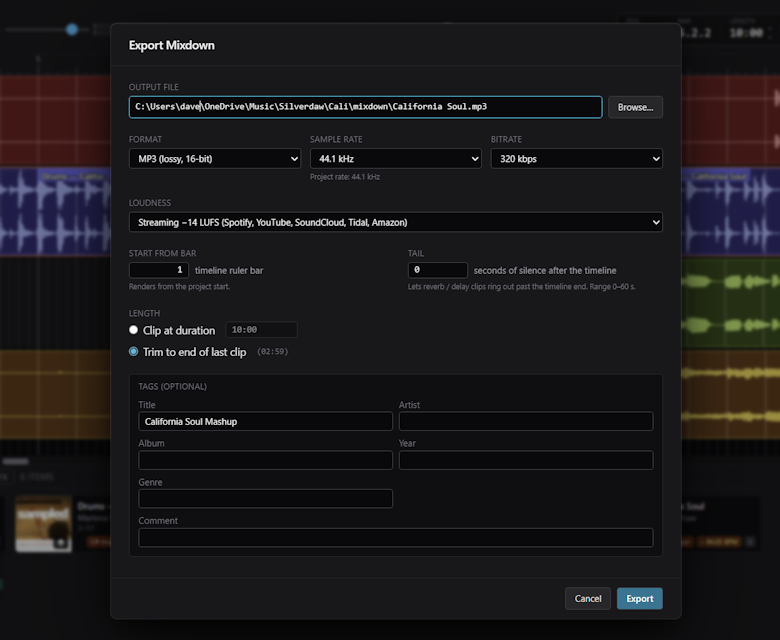
Choose an Output file, or use Browse… to choose where to save it. When you have finished the settings below, click Export.
Choosing a format
Silverdaw can export to:
- WAV
- FLAC
- AIFF
- MP3
Audio is processed internally in high-quality 32-bit floating point from start to finish, and converted to the final bit depth only when you export. Export defaults to 16-bit, with 24-bit and 32-bit float also available depending on the format:
- WAV: 16 / 24 / 32-bit float
- FLAC and AIFF: 16 / 24
For 16-bit exports, a Dither option (TPDF) is available. Dithering is recommended, as it smooths out the tiny rounding that happens when reducing to 16-bit.
Choose a Sample rate of 44.1 kHz or 48 kHz. For MP3, choose a Bitrate of 128 kbps, 192 kbps, or 320 kbps.
Adding tags
Tags (optional) lets you add Title, Artist, Album, Year, Genre, and Comment details to the exported file.
Loudness and level
Optionally, Silverdaw can apply loudness normalisation so your export lands at a consistent loudness. You can set a Target LUFS (the overall loudness) and a Ceiling dBTP (the highest allowed peak) to keep the level in check.
Choosing where the render starts and ends
- Start from bar — choose which bar the render begins from, so you can skip any lead-in.
- Tail — add up to 60 seconds of silence after the timeline, so reverb and delay can ring out.
- Length — choose Clip at duration and enter a length, or Trim to end of last clip so the render ends where your final clip does.
After exporting
Your exported file is a standard audio file — play it, share it, or upload it wherever you like. Because export is separate from your project, you can keep tweaking the mix and export again as many times as you want.